
How Much Does Video Marketing Actually Cost? A Realistic Breakdown for Growing Businesses
Video marketing costs can vary widely, but understanding these expenses upfront can help you plan effectively. A professionally produced video can cost anywhere from $500 for a DIY social media ad to over $100,000 for high-end brand commercials. Here's a quick breakdown:
Production: Typically 40–50% of the total budget. Costs depend on crew size, equipment, location, and complexity. For example, hiring a Director of Photography can range from $500 to $2,500 per day.
Post-Production: Accounts for 20–35% of the budget. Editing, sound design, and motion graphics can add $1,000 to $15,000+ depending on the project.
Distribution: Social media ads and promotions can cost $500 to $50,000+, depending on the platform and campaign scope.
For growing businesses, a mid-tier video (e.g., a 60-second explainer) typically costs $5,000 to $15,000. Cutting costs is possible by batching multiple videos in one shoot, using stock footage, or leveraging AI tools for post-production.
Key takeaway: A well-planned video marketing budget ensures better ROI and reduces waste. Allocate funds wisely across production, editing, and promotion to maximize impact.
How Much Does Video Production Really Cost Your Business?
Production Costs Explained
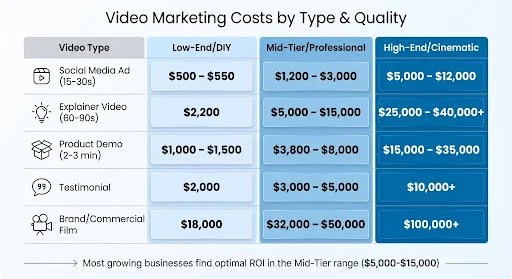
Video Marketing Cost Breakdown by Video Type and Production Quality
Production costs typically make up 40–50% of your total video budget. Knowing how these costs break down can help you plan effectively and avoid unexpected expenses that might disrupt your project.
Several factors drive production costs, including the length of the shoot, the size of the crew, and their level of expertise. For example, professional crews charge daily rates: a Director of Photography might cost anywhere from $500 to over $2,500 per day, while specialized roles like Sound Recordists range from $500 to $1,500+. If you're working with SAG-AFTRA actors, their day rates start at $1,246 in 2025.
Your choice of location also plays a big role in costs. A studio shoot offers more predictable expenses, while on-location shoots can rack up costs for permits, travel, and even weather-related delays. The rise of LED lighting stages has helped reduce these expenses. Equipment costs have dropped by 18%, and these stages can cut location-related costs by about 40%.
"Small businesses with a good idea and willingness to get scrappy should optimistically recognize that successful video advertising is not beyond their means." - Wistia
A great example comes from Wistia, which in 2018 created three versions of an ad for their Soapbox app. They spent $1,000 on a phone-shot version, $10,000 on a professional camera version, and $100,000 on a full production crew. Interestingly, the $10,000 version delivered the best Cost Per Install, showing that mid-level production often provides the strongest return on investment.
Costs by Video Type
The type of video you're producing has a significant impact on your budget. For instance, social media ads (15–30 seconds) are typically the least expensive, ranging from $500 for DIY efforts to $12,000 for polished, cinematic work. Many brands are now leaning into User-Generated Content (UGC), often filmed on smartphones, to bypass the costs of traditional crews and equipment.
Explainer videos (60–90 seconds) generally cost between $5,000 and $15,000 for professional production, but prices can climb to $40,000+ for projects involving complex animation or premium production values. The choice between animation and live-action plays a big role here. Animated videos usually cost $8,000–$30,000, while live-action projects range from $10,000–$50,000+ due to added logistics like locations and travel.
Product demos (2–3 minutes) typically fall in the $3,800–$8,000 range for mid-level production. Costs depend on the number of product features highlighted and the amount of supplementary footage (b-roll) required.
Testimonial videos are relatively simple to produce, with professional versions costing $3,000–$5,000, though high-end productions can exceed $10,000. On the higher end of the spectrum, brand commercials and corporate films start at $32,000 for mid-tier work and can easily surpass $100,000 for cinematic campaigns involving multiple shooting days.
| Video Type | Low-End / DIY | Mid-Tier / Professional | High-End / Cinematic |
|---|---|---|---|
| Social Media Ad (15-30s) | $500 – $550 | $1,200 – $3,000 | $5,000 – $12,000 |
| Explainer Video (60-90s) | $2,200 | $5,000 – $15,000 | $25,000 – $40,000+ |
| Product Demo (2-3 min) | $1,000 – $1,500 | $3,800 – $8,000 | $15,000 – $35,000 |
| Testimonial | $2,000 | $3,000 – $5,000 | $10,000+ |
| Brand/Commercial Film | $18,000 | $32,000 – $50,000 | $100,000+ |
What Affects Production Costs
Crew size and expertise are among the biggest cost drivers. A professional team typically costs $5,000–$20,000 per day. However, the shift to hybrid crews (3–7 people) instead of the traditional larger teams (12–20 people) has made mid-level projects more affordable while maintaining quality.
Technical complexity also plays a major role. Simple talking-head videos are relatively inexpensive, but incorporating animation, stunts, or special effects can significantly inflate costs. Equipment needs vary too. While professional camera rental prices have dropped by 9% in 2025, specialized tools like drones, stabilizers, or cinema-grade lenses still add to the budget.
Pre-production planning is often overlooked but critically important. Proper scripting, storyboarding, casting, and location scouting can double your chances of staying on schedule and within budget. Skipping this phase can lead to expensive on-set delays, where downtime might cost as much as $1,100 per minute.
"The key to finding the best professional video production service isn't just about speed - it's about their ability to scale creative output while preserving your brand's essence." - Michael Pirone, Co-Founder, Vidico
One effective way to manage costs is by batching multiple videos into a single shoot day. By sharing setup, crew, and location expenses across several projects, you can cut per-video costs by 30–60%. For example, you can capture footage formatted for different platforms - vertical for TikTok, horizontal for YouTube - during the same shoot, avoiding expensive reshoots.
Using stock footage for b-roll or establishing shots is another way to save money without sacrificing quality. Additionally, always set aside 5–8% of your total budget as a contingency fund to cover unexpected issues like weather delays, equipment malfunctions, or scheduling conflicts with talent.
With production costs laid out, the next step is to dive into post-production and editing expenses, where more critical budget decisions come into play.
Post-Production and Editing Expenses
Once the cameras stop rolling, the real magic begins - post-production. This phase takes the raw footage and transforms it into polished, engaging content. It’s no small part of the process, often accounting for 20% to 35% of the total video budget, with many projects leaning closer to the higher end of that range. Why such a hefty chunk? Because elements like editing, color grading, sound design, and motion graphics are what turn basic footage into something that grabs and holds attention.
For example, editing a simple social media clip might take just 1–4 hours and cost $50–$400. On the other hand, a corporate interview involving multiple camera angles, B-roll, and color correction can require 8–20 hours of work, with costs ranging from $400 to $2,000. Add animations or visual effects, and you’re looking at anywhere between $1,000 and $15,000+.
Hourly rates for editors vary widely. Basic editing can run $10–$60 per hour, while specialized tasks like 3D animation or cinematic effects can cost $100–$300+ per hour. Many editors prefer project-based pricing to avoid unexpected scope changes. For instance, a full editing package for a two-minute explainer video might range from $1,000 to $10,000, depending on factors like revisions, music licensing, and graphic elements.
"Post-production now accounts for 35% of project budgets. If post consumes less than one-third of your total, you're risking a B-minus product where polish drives the A+."
– Michael Zeligs, Founder, Start Motion Media
Cutting Costs Without Cutting Corners
There are ways to manage post-production expenses without sacrificing quality. Building an asset library - complete with reusable motion graphics, branded templates, and intro/outro sequences - can reduce ongoing video costs by 30–40%. AI tools are also reshaping the industry. Automated features like transcriptions, color correction, and dubbing can slash post-production costs by as much as 60–80%, especially for projects involving localization. Don’t forget to set aside 10–20% of your budget for revisions, as feedback and last-minute adjustments are almost inevitable.
Breaking Down Post-Production Costs
Here’s a closer look at where your budget might go:
Video editing: The cornerstone of post-production, with costs ranging from $1,000 to $10,000+ per project.
Color grading: Ensures consistent, professional visuals and typically costs $500–$3,000.
Sound design and mixing: Equally important, as poor audio is a top reason viewers stop watching. Costs also fall between $500 and $3,000.
Additional costs to consider:
Voiceovers: Prices range from $300 to $2,000 per voice, depending on talent and usage rights.
Music licensing: Stock tracks can cost $11–$1,000, while custom compositions for premium projects are much higher.
Animation and motion graphics: These can range from $1,000 to $15,000+.
Specialized roles, like professional colorists or visual effects artists, command daily rates of $500–$1,500+. For smaller budgets, freelancers offer more affordable hourly rates, typically between $15 and $150. Agencies, while pricier, bring structured workflows and dedicated teams, making them ideal for complex commercial projects.
Real-World Examples
In 2024, Lisa Huang, CMO of a SaaS company, cut her campaign budget nearly in half - from $110,000 to $56,000 - by using AI-powered tools for B-roll generation and automated narration. This also allowed her to expand the campaign’s global reach through automated localization. Similarly, Heineken revamped its training modules using AI-powered video, reducing onboarding times by 45% and slashing production costs significantly.
Tips to Stay on Budget
To avoid surprises, start with a clear project scope. Define expectations for music, graphics, and revisions upfront to prevent scope creep. If you’re producing multiple videos, consider batch editing - this spreads out setup costs and lowers the per-video price. Finally, focus on capturing high-quality raw footage. Shots that are well-lit and properly framed require less post-production work, which directly saves time and money.
Distribution and Promotion Costs
Once you've nailed production and post-production, the next hurdle is getting your video in front of the right audience. This phase requires careful budgeting to ensure your video marketing strategy has a lasting impact.
Creating an impressive video is only part of the equation. Reaching your target audience often involves additional costs. While organic posting is free, expanding your reach typically calls for paid strategies like ads or influencer collaborations. Social media video ad campaigns, for instance, can cost anywhere from $500 to $10,000, depending on factors like your target audience, campaign length, and platform.
Beyond ad spend, distribution costs can include hosting fees, platform charges, and data storage. For example, hosting services like Animoto charge under $50 per month. Additionally, tailoring a video for platforms like Instagram, TikTok, and YouTube involves formatting and encoding expenses, but this effort can significantly enhance your campaign's reach and effectiveness.
"A 4:1 ratio is the ballpark that you should aim for." – Charles Sinclair, Founder, Life Inside
This means that for every dollar spent on video ads, you should aim for a $4 return. Many businesses allocate 20% to 30% of their video marketing budget to promotion, often starting with 10–15% of their overall marketing budget for video creation. As campaigns gain traction, budgets can scale accordingly. The rewards are clear: 83% of businesses report positive ROI from social video ads, and adding videos to email campaigns can increase click-through rates by up to 300%.
Platform and Advertising Costs
Ad spend varies widely depending on the platform and the complexity of your campaign. For smaller budgets, platforms like TikTok and Instagram Reels are ideal for short-form, DIY-style videos, with costs ranging from $500 to $2,000. Mid-tier campaigns on platforms like Facebook, YouTube, and LinkedIn typically fall between $2,000 and $10,000, while high-end campaigns that span multiple channels or involve cinematic production can exceed $50,000.
| Campaign Tier | Estimated Ad Spend | Primary Platforms | Typical Deliverables |
|---|---|---|---|
| Low-Budget | $500 – $2,000 | TikTok, Instagram Reels | Short-form, DIY-style clips |
| Mid-Tier | $2,000 – $10,000 | Facebook, YouTube, LinkedIn | Professional product demos, testimonials |
| High-End | $10,000 – $50,000+ | Multi-channel, TV, Global | Cinematic ads, influencer collaborations |
To get the most out of your budget, negotiate for extras like multiple aspect ratios, varied calls-to-action, and access to raw files. These additions can help with version testing and future campaigns. Using AI tools to automate video formatting can also reduce costs when adapting content for different platforms. Finally, always keep a 10–15% contingency fund for unexpected expenses or additional revisions.
How to Budget for Video Marketing
Start by setting clear KPIs that align with your goals. Are you aiming to generate leads, boost brand awareness, or drive conversions? Your objectives will determine the type of videos you create and the budget you’ll need to allocate. This step ensures your spending is purposeful and effective across all stages of production.
A practical way to distribute your budget is by dividing it among the key production phases. Typically, allocate 20–30% for pre-production (activities like scripting, planning, and casting), 40–50% for production (filming, crew, and equipment), and 25–30% for post-production (editing, sound design, and color grading). While it might be tempting to cut costs, choosing the cheapest option can backfire - low-quality videos can harm your brand image and deter potential customers.
Another factor to consider is the long-term value of your investment. For instance, a professionally produced video costing $25,000, used consistently over three years, breaks down to about $700 per month. This can often be more economical than running ongoing SEO campaigns or paid advertisements. Thinking about costs in this way can make a higher upfront investment easier to justify, especially for content designed to stay relevant over time.
"Smart video pricing goes beyond covering expenses. It's about proving that the right spend leads to measurable ROI and long-term business results." – Liza Burke, Marketing Director, Levitate Media
Working with agencies like Burt's Media can also optimize your budget. Agencies often create reusable asset banks - like motion graphics, B-roll libraries, and templates - that can cut future project costs by 30–40%. They also streamline production by batching multiple videos into single shoot days, reducing expenses for crew and equipment.
Scaling Your Video Marketing Budget
As your business grows, your video marketing budget should expand accordingly. For startups with annual revenue under $1 million, budgets typically range from $3,000 to $10,000. At this stage, focus on foundational content like social media clips, testimonials, or training videos. To maximize your spending, consider filming multiple videos in one session.
For businesses earning $1 million to $10 million annually, video investments usually increase to $10,000–$25,000. This level allows for professional storytelling, product launch videos, and polished explainers. A smart strategy here is to repurpose assets: a single shoot can produce a homepage video, social media clips, and other content, delivering more value from your initial spend.
Established companies with revenue exceeding $10 million often allocate $25,000–$100,000 or more for cinematic productions, multi-market campaigns, and advanced visual effects. Subscription-based models are worth considering at this stage, as they provide predictable monthly costs and allow for continuous content creation.
Here’s a snapshot of typical monthly budgets across different growth stages:
| Growth Stage | Monthly Budget | Typical Output | Primary Focus |
|---|---|---|---|
| Startup | $1,000 – $3,000 | 2–4 social clips or testimonials | Building a content library |
| Scaling | $3,000 – $8,000 | 1 main video + 6–8 social cutdowns | Maintaining a consistent brand presence |
| Established | $8,000 – $20,000+ | Multiple campaign videos + ongoing assets | Multi-channel campaigns with testing |
Conclusion
Understanding and managing video marketing costs is key to ensuring your efforts contribute to sustainable growth.
Video marketing expenses can vary significantly. The challenge isn’t about finding the cheapest option - it’s about making smart investments that deliver a solid return. Keep in mind, low-quality videos can hurt your brand. In fact, 62% of consumers report forming a negative impression after watching poorly produced content. By planning carefully and budgeting wisely, video can become one of the most efficient tools in your marketing arsenal.
To keep costs under control, focus on strategic pre-production and efficient filming techniques. Allocate around 25–30% of your budget to planning, scripting, and storyboarding. Building a library of reusable assets and filming in batches can help reduce future expenses. Additionally, using stock footage where appropriate and limiting revision rounds can help you avoid unnecessary post-production costs.
"The cost conversation shouldn't overshadow your objectives. Think about what you want your video to accomplish... The better your goals are defined, the clearer your investment roadmap will be." – Cramer
Whether you’re a startup working with a $3,000 budget or a larger company able to invest $100,000 or more, tie your spending to well-defined KPIs. This ensures every video delivers measurable outcomes. Prioritize creating evergreen content that stays relevant over time.
Frequently Asked Questions
-
When planning a video marketing budget, it’s crucial to weigh several factors to make the most of your resources. Start by identifying the type of video you need - whether it’s an explainer video, a product demo, or a social media ad. Each format comes with its own set of production needs and costs. The length of the video also plays a role; longer videos typically demand more time for filming and editing, which can increase expenses.
Another key element is production complexity. This includes things like hiring a professional crew, renting specialized equipment, securing filming locations, and using props or on-screen talent. These costs can vary significantly depending on your project’s scope. Don’t overlook post-production costs, either. Editing, adding animations, and refining sound design can add up quickly but are essential for a polished final product. Lastly, factor in your distribution and promotion strategy. Reaching your audience effectively might require additional spending on advertising or platform-specific tools to amplify your video's reach.
By taking these aspects into account, you’ll be able to set a budget that supports your goals while maximizing the impact of your video marketing efforts.
-
Small businesses don’t need massive budgets to create effective video content. With a little planning and smart choices, you can produce great videos without overspending.
Start by defining the purpose of your video. What message are you trying to convey? By focusing on your goal, you can avoid splurging on unnecessary extras. Simpler formats, like slideshow videos or basic product demonstrations, often get the job done at a fraction of the cost.
Another way to cut expenses is by using budget-friendly tools. AI-powered editing software, for example, can streamline production while keeping costs low. You might also save by reducing on-location shoots or working with smaller, hybrid crews.
The key is careful planning and taking advantage of modern tools. With these strategies, small businesses can create videos that deliver results - without blowing through their budgets.
-
AI-powered video editing tools bring efficiency, cost reduction, and scalability to the table, making them a game-changer for businesses. By automating tasks such as editing, localization, and adding effects, these tools can slash production costs by as much as 70–90% compared to traditional methods. Plus, they significantly speed up workflows, allowing businesses to deliver content faster - a critical advantage for staying competitive and boosting ROI.
Another standout benefit is their ability to simplify localization. AI tools can translate videos into multiple languages with ease, cutting localization expenses by 60–80%. For businesses looking to grow, these tools provide a practical way to create polished, professional videos while keeping budgets and resources in check.
